Find the solution with TZ iBoat, the latest generation of marine navigation apps
All the information about TZ iBoat features, instruments and compatibilities, charts and weather data, are available here. More than 40 questions have been answered so that you can make the most of your experience using TIMEZERO’s coastal sailing app solution.
Yes. TZ iBoat was originally available only on iOS, but Android support was introduced with TZ iBoat version 4, released in June 2026.
TZ iBoat is compatible with iPhones and iPads running iOS 14.2 or later, and with Android phones and tablets running Android 11 or later with at least 4 GB of RAM.
On Android, TZ iBoat requires a Google Play Protect certified device and successful device integrity verification. As a result, devices running alternative Android operating systems, such as GrapheneOS, CalyxOS, LineageOS, /e/OS, or other custom Android distributions, may not be supported. TZ iBoat for Android is also not compatible with Chromebooks or devices running Android Go.
On iPad, we recommend using a model with Cellular connectivity, as these models include a built-in GPS receiver. Wi-Fi-only iPads do not have an internal GPS and therefore require either an external Bluetooth GPS or a connection to an NMEA 0183 wireless gateway. Access to an NMEA 0183 wireless gateway requires an active TZ iBoat Essential subscription.
TZ iBoat is designed to work offline once your charts have been downloaded. After purchasing a TZ MAPS area, you can store the chart locally on your device from the “Offline Charts & Weather” screen, along with weather forecasts for offline use during your trip.
The following content requires an active Internet connection:
- Streaming charts that have not been downloaded for offline use
- Satellite Photo overlay (satellite imagery cannot be stored locally)
- TZ Online AIS (worldwide AIS data via Internet, available with the Essential plan)
- Downloading new chart updates or weather forecasts
Yes, under specific conditions. TZ iBoat is designed to keep running in the background when it needs to maintain a critical navigation task.
TZ iBoat continues to run in the background when any of the following is active:
- Trip recording
- An active route (navigation to a destination) or FishIt is active
- A chart or weather download in progress
- Anchor Watch
- Depth Alarm
- Wind Speed Alarm
In any of these cases, TZ iBoat continues to track your position, trigger alarms, and maintain the active task even when your screen is off or you switch to another app.
If none of the above is active, the app may be terminated in the background. You can resume where you left off by reopening the app.
Note: Running TZ iBoat in the background uses your device's GPS continuously, which may have a noticeable impact on battery life.
iOS: settings that affect background operation
For TZ iBoat to track your position in the background on iOS, make sure that:
- TZ iBoat has Location permission set to "Always" (Settings → Privacy & Security → Location Services → TZ iBoat → Always). If set to "While Using the App," position tracking stops as soon as the app is in the background.
- Background App Refresh is enabled for TZ iBoat (Settings → General → Background App Refresh)
- Low Power Mode is turned off during long trips, as it can reduce background activity
Android: manufacturer-specific battery optimization
Some Android manufacturers (Samsung, Xiaomi, Huawei, OPPO, and others) apply aggressive battery optimization that can close apps in the background even when those apps need to keep running. If you notice that Trip recording stops or alarms fail to trigger when your screen is off:
- Open your Android device's Settings
- Navigate to Apps → TZ iBoat → Battery (the exact path varies by manufacturer)
- Set the battery optimization for TZ iBoat to "Unrestricted" or "Don't optimize"
If TZ iBoat is not displaying your position, or if your position works near the marina but disappears once you are offshore, the issue is usually one of the following.
Your device does not have a built-in GPS.
Some devices, including Wi-Fi-only iPads, do not include GPS hardware. Near a marina, the device can estimate position from nearby Wi-Fi networks, which is why position may appear correctly there. Once you are offshore, this is no longer available and no position can be determined. To use TZ iBoat for real navigation on such a device, add an external position source: a Bluetooth GPS receiver, or an NMEA0183 GPS connected through a Wi-Fi gateway (see "Can I use a Wi-Fi only iPad?").
TZ iBoat rejected the position because accuracy was too low.
TZ iBoat applies strict thresholds to the location accuracy reported by the device's operating system:
- Over 10 meters: a ring is drawn around the vessel symbol to indicate the uncertainty.
- Over 20 meters: a "Poor GPS" warning is triggered (this warning can be disabled in Settings → Alarms).
- Over 50 meters: the position is rejected, and a "Position Lost" alarm is triggered if accuracy does not improve within 30 seconds.
In poor satellite reception (indoor use, blocked sky view), these thresholds may cause TZ iBoat to show no position even when the device itself has a rough fix. Moving to an open area or waiting for better satellite visibility usually resolves this.
On Android: TZ iBoat uses Raw GPS, not Fused Location.
Android offers two location sources: "Raw GPS" and "Fused Location." Fused Location combines GPS with nearby Wi-Fi networks and cellular data to speed up position acquisition, which works well on land but introduces inaccuracies in a marine environment. For example, a Wi-Fi router on your boat appears stationary to Android, but in reality moves with the vessel, producing a false reference.
By default, TZ iBoat uses Raw GPS to avoid this issue. As a result, you may sometimes see a position in another app (such as Google Maps, which uses Fused Location) when TZ iBoat shows none. For troubleshooting, the GPS Source can be switched to Fused Location in Instrument Connections → Internal GPS.
Why is TZ iBoat stricter about position quality than other apps?
Marine navigation depends on accurate position data. A general-purpose map app showing your location off by 100 meters is a minor inconvenience; the same error on a chart near rocks, shoals, or a narrow channel could put your boat at risk. Rather than display a position we cannot trust, TZ iBoat prefers to show no position and warn you.
Route Assist is a planning aid included with TZ MAPS that automatically suggests a navigable path between two points based on chart data and your boat's specifications. It is designed to save time during initial route planning and to highlight potentially unsafe areas based on the chart information available.
Route Assist is a planning aid, not a guarantee of safe passage.
Like any automatic routing tool, Route Assist depends entirely on the accuracy and completeness of the underlying chart data. It cannot account for:
- Shoaling, dredging, or other recent changes not yet reflected in the chart
- Temporary hazards such as floating debris, fishing equipment, wrecks not yet charted, or ice
- Real-time weather, sea state, current, or visibility
- Local navigation rules, traffic patterns, marina entry procedures, or local knowledge
- Bridges, locks, and clearance restrictions not fully encoded in the chart data
The captain remains responsible for verifying every route before using it for navigation. Always review the proposed route on the chart at a sufficient zoom level to see hazards along the path, and adjust waypoints manually where needed. Pay particular attention in shallow areas, narrow channels, near port entrances, and in unfamiliar waters.
Recommended workflow:
- Use Route Assist to generate an initial suggestion between your start and end points.
- Review the proposed route on the chart, zooming in to inspect each segment.
- Adjust waypoints manually where the suggested path is sub-optimal or where your local knowledge indicates a better path.
- Re-check the route under current conditions (tide, weather, daylight) before starting navigation.
Note: Route Assist is a TZ MAPS exclusive feature and requires an active TZ MAPS subscription for the area you are planning in.
Yes. TZ iBoat supports importing and exporting routes and marks in GPX format, the standard interchange format used by most marine navigation software and chart plotters. This lets you transfer your data between TZ iBoat and other apps or devices.
Note: If you use TZ iBoat alongside other TimeZero products with the same My TIMEZERO account, your User Objects (marks, routes, trips, boundaries…) are shared automatically without needing a manual import or export.
TZ iBoat is free to download and includes a basic worldwide overview chart. To use TZ iBoat for real navigation, you will want detailed charts for your region. Beyond that, there are three independent types of purchase, each covering a different need. You can buy any combination, since they do not require each other.
1. TZ MAPS chart subscriptions (cartography). A yearly subscription that gives you access to detailed nautical charts (Vector, Raster where available, high-resolution bathymetry, and satellite imagery) for a specific region. To let you evaluate the app with detailed charts, every new user gets a free 7-day trial of TZ MAPS for a region of their choice.
2. TZ iBoat plans (software features). A monthly or yearly subscription that unlocks software features such as connectivity to external instruments, AIS, autopilot, advanced weather, and oceanographic data. Plans are tiered: Essential → Premium → Elite, where each plan includes everything in the one below it.
3. Furuno hardware modules (one-time purchase). One-time, non-subscription purchases that unlock connectivity to specific Furuno hardware: the DRS4W “1st Watch” Radar module and the FCV600/800 Fish Finder module. You only need these if you own the corresponding Furuno hardware.
Charts, plans, and modules are independent. You can buy a plan without ever purchasing a chart subscription, and vice versa.
The full list of current chart areas, plans, and modules with their prices is available at https://mytimezero.com/tz-iboat/charts-directory and from the in-app Store.
TZ iBoat is free to download from the Apple App Store and Google Play. Without any purchase, you can use the following at no cost:
- Real-time boat positioning on a free worldwide overview chart
- 2D and 3D navigation views
- Route planning
- Anchor Watch
- Trip recording, including position, speed, photos, catches, and events
- Tides and currents data
- Worldwide GFS weather forecasts and oceanic currents
- Offline weather access
To take full advantage of the app, detailed charts are recommended. Every new user gets a free 7-day TZ MAPS trial to download detailed charts for one region and evaluate TZ iBoat with real navigation data.
TZ MAPS includes the full cartography for your region (vector charts, raster charts where available, high-resolution satellite photos, and high-resolution bathymetry), along with a set of exclusive features that work alongside the charts:
- BathyVision
- Dynamic Moorings
- Community Maps
- Dynamic Lights
- Smart Search
- Smart Zones
- Route Assist
Chart purchase is a yearly subscription with a 7-day free trial. After purchasing a region, you can download charts for offline use from the "Offline Charts & Weather" menu or stream them by zooming in while connected to the internet. The full list of chart regions is available at https://mytimezero.com/tz-iboat/charts-directory.
While TZ MAPS does not yet offer worldwide coverage, it includes most of the world's popular boating regions. The full list of regions with detailed TZ MAPS coverage is available in our chart directory at https://mytimezero.com/tz-iboat/charts-directory.
Yes. Any charts you have already downloaded remain on your device and usable after your subscription ends. However:
- You will no longer receive chart updates.
- You will not be able to download new charts or re-download charts on a new device.
- Some features that require active chart data, including Route Assist and Community Edit, will be unavailable until you renew.
Auto-renewal can be turned off at any time through your Apple ID or Google Play account settings (at least 24 hours before the end of the current period to avoid being renewed).
No. If you purchase a TZ MAPS chart on TZ Navigator, TZ Professional, or a compatible Furuno MFD, that chart entitlement carries over to TZ iBoat and gives you one year of free TZ MAPS access on TZ iBoat for the same region.
Just sign in to TZ iBoat with the same My TIMEZERO account you used to purchase the chart on the other platform, and the chart will appear in your inventory automatically.
TZ iBoat offers a tiered subscription model. Each plan builds on the previous one. Premium includes everything in Essential, and Elite includes everything in Premium.
TZ iBoat Essential (/month or /year ) includes:
- External instruments (GPS, depth, wind, etc.) via NMEA0183 over Wi-Fi or Bluetooth
- AIS (local receiver and TZ Online AIS worldwide)
- Autopilot control via Wi-Fi NMEA
TZ iBoat Premium (/month or /year ) includes everything in Essential, plus:
- High-resolution marine forecasts
- Real Time Rain Radar and Lightning
- Multiple weather models (GFS, Arpege, Arome, DWD ICON, NAM Conus HR, Copernicus)
TZ iBoat Elite (/month or /year ) includes everything in Premium, plus advanced oceanographic data layers:
- Sea Surface Temperature
- Chlorophyll
- Sea Surface Height
- Ocean Currents
Plans can be purchased and managed from the “Plans” section in the in-app Store.
With TZ iBoat V4, some features have been reorganized into the new Essential, Premium, and Elite plans. If you purchased any TZ iBoat product before June 1, 2026, including the former standalone AIS module, you are considered an existing TZ iBoat user and receive the Essential plan free for life. This ensures that you keep access to features that were previously available to you, including:
- External instrument connection, such as GPS, depth, wind, and other NMEA0183 data
- AIS display, including AIS from a local receiver and TZ Online AIS
- Autopilot output via Wi-Fi NMEA
Some plan names have also changed in TZ iBoat V4:
- Weather Premium is now called Premium
- SportFishing is now called Elite
These are naming and packaging changes. If you already have an active subscription, your access continues according to your current subscription. If you cancel and subscribe again later, the current V4 plan names, prices, and conditions will apply.
The TZ iBoat Premium plan is cross-product. It corresponds to the Premium Weather plan available on TZ Navigator and TZ Professional, at the same price. A single subscription gives you access on all three platforms.
This works in both directions:
- If you already subscribe to Premium Weather on TZ Navigator or TZ Professional, you automatically get the Premium plan on TZ iBoat at no additional cost.
- If you subscribe to the Premium plan on TZ iBoat, you automatically get Premium Weather on TZ Navigator and TZ Professional.
In both cases, the entitlement follows your My TIMEZERO account. Simply sign in to each application with the same account, and the entitlement is applied automatically.
About the other plans:
The Essential plan is specific to TZ iBoat. Its features (connectivity to external instruments, AIS, and autopilot) are available natively in TZ Navigator and TZ Professional, so no equivalent plan is required on those platforms.
The Elite plan is currently exclusive to TZ iBoat. There is no equivalent plan on TZ Navigator or TZ Professional.
A note on Premium Ocean-O (TZ Professional only):
TZ Professional offers a separate plan called Premium Ocean-O, available exclusively through TimeZero Dealers. Unlike the Premium Weather plan, Premium Ocean-O is tied to the specific TZ Professional serial number on which it was activated, not to a My TIMEZERO account. As a result, Premium Ocean-O does not transfer to TZ iBoat, even with the same My TIMEZERO account. The closest equivalent on TZ iBoat is the Elite plan, which must be purchased separately.
TZ iBoat offers two optional Furuno integration modules, available as one-time (non-subscription) purchases through the in-app Store:
- Furuno DRS4W “1st Watch” Radar module: adds radar echo overlay on the chart with basic radar control.
- Furuno FCV600/800 Fish Finder module: adds a full sounder screen, with control over range, gain, frequency, and display options.
The Furuno modules are independent of TZ iBoat plans and TZ MAPS chart subscriptions. You only need the module itself, plus the corresponding Furuno hardware on your boat. No subscription is required.
Pricing is available in the in-app Store and at https://mytimezero.com/tz-iboat/charts-directory.
Because TZ iBoat subscriptions are purchased through the Apple App Store or Google Play, we do not have direct control over cancellation. You must cancel through the same store where you originally subscribed.
Cancelling on iOS (Apple App Store):
- Open the Settings app on your iPhone or iPad
- Tap your name at the top of the screen
- Tap Subscriptions
- Tap the TZ iBoat subscription you want to cancel
- Tap Cancel Subscription (you may need to scroll down to find this button)
Apple's official guide: https://support.apple.com/en-us/118428
Cancelling on Android (Google Play):
- Open the Google Play Store app on your Android device
- Tap your profile icon (top-right)
- Tap Payments & subscriptions, then Subscriptions
- Select the TZ iBoat subscription you want to cancel
- Tap Cancel subscription and follow the on-screen instructions
Google's official guide: https://support.google.com/googleplay/answer/7018481
What happens after you cancel:
- Your subscription remains active until the end of the current billing period. You will keep access to all the features of your plan until then.
- You will not be charged at the next renewal date.
- For TZ MAPS chart subscriptions, any charts you have already downloaded remain usable on your device. You will no longer receive chart updates or be able to re-download charts (see "Will my charts keep working after my TZ MAPS subscription ends?").
- For TZ iBoat plans, the corresponding features (external instruments, advanced weather, oceanographic data, etc.) become unavailable at the end of the billing period.
- To avoid being charged for the next period, cancel well before the renewal date (Apple recommends at least 24 hours).
Note: Cancelling a subscription does not delete your My TIMEZERO account. Your account, User Objects (Marks, Routes, Trips), and any one-time module purchases remain intact. If you also want to remove your account, see "How do I delete my account?"
Like cancellations, refunds for TZ iBoat purchases (subscriptions and one-time modules) are handled by the Apple App Store or Google Play, not directly by us. Refund eligibility is decided by Apple or Google based on their respective policies.
Requesting a refund from the Apple App Store (iOS):
- Open https://reportaproblem.apple.com in a web browser
- Sign in with the Apple ID used to make the purchase
- Tap or click "I'd like to..." and choose "Request a refund"
- Select the reason for your refund request, then choose Next
- Choose the TZ iBoat purchase you want refunded, then choose Submit
Apple will review your request and notify you of their decision by email. If approved, the funds are returned to your original payment method.
Apple's official refund page: https://support.apple.com/en-us/118223
Requesting a refund from Google Play (Android):
Google Play has a 48-hour self-service refund window for most purchases.
Within 48 hours of purchase:
- Open https://play.google.com/store/account in a web browser
- Go to Payments & subscriptions, then Budget & order history
- Find the TZ iBoat purchase you want refunded and click "Report a problem"
- Select the reason that matches your situation and complete the form
- Submit
Decisions usually arrive within 1 to 4 business days.
Google's official refund page: https://support.google.com/googleplay/answer/2479637
The My TIMEZERO account is the central account that links your TZ iBoat installations across all your devices. Signing in with the same My TIMEZERO account on each device ensures that your purchases, your User Objects (Marks, Routes, Trips, etc.), and your boat profile are available on every device you use.
The My TIMEZERO account is free to create and can be set up directly from within TZ iBoat the first time you launch the app, or at mytimezero.com. The same My TIMEZERO account is also used across the broader TimeZero ecosystem, including TZ Navigator (PC), TZ Professional (PC), and compatible Furuno MFDs.
You can create a My TIMEZERO account the first time you launch TZ iBoat. Three sign-in methods are supported:
- Email and password (default)
- Sign in with Apple
- Sign in with Facebook
You can also create your account online at mytimezero.com before installing the app, then use the same credentials to sign in on TZ iBoat. Creating a My TIMEZERO account is free and does not require any purchase.
Note: If you already have a My TIMEZERO account from another TimeZero product (TZ Navigator, TZ Professional, or a compatible Furuno MFD), use that existing account to sign in on TZ iBoat rather than creating a new one.
You must use the same sign-in method every time you sign in to your My TIMEZERO account. If you originally created your account with Apple, you cannot later sign in using email and password, even with the same email address. Each sign-in method creates a separate account.
If you would like to switch sign-in methods (for example, to convert an Apple or Facebook account to email and password), please contact our support team at support@mytimezero.com. This is a manual process that we can handle on your behalf.
If you have forgotten which method you used to sign up, our support team can help you identify it.
If you signed up using email and password, the easiest way to reset your password is from a web browser:
- Go to login.mytimezero.com
- Click “Forgot password”
- Enter your email address
- Follow the link sent to your inbox to set a new password
If you signed up using Sign in with Apple or Sign in with Facebook, password management is handled by Apple or Facebook, not by TZ iBoat. To reset your sign-in credentials, please use the password recovery tools provided by Apple or Facebook directly. We cannot manage these credentials on your behalf.
If you would like to switch from an Apple or Facebook sign-in to email and password, please contact support@mytimezero.com.
The email address associated with a My TIMEZERO account cannot currently be changed from within the app. If you need to update your email (for example, because you have changed email providers), please contact our support team at support@mytimezero.com with both your current email and the new email you would like to use.
Yes. You can install and use TZ iBoat on up to 5 devices at the same time. These can be any combination of iPhones, iPads, and Android phones or tablets. Just sign in with the same My TIMEZERO account on every device.
When you sign in with the same My TIMEZERO account on multiple devices, the following items are automatically shared:
Purchases:
- Chart subscriptions (TZ MAPS areas)
- Subscription plans (Essential, Premium, Elite)
- One-time module purchases (Furuno DRS4W Radar module, Furuno FCV600/800 Sounder module)
User objects:
- Marks
- Routes
- Trips (including recorded position, speed, depth and wind)
- Boundaries
- Catches
- Photos
Boat profile:
- Boat name
- MMSI
- Boat Dimensions
Note: Charts that have been cached locally for offline use are stored on the device itself. When you sign in on a new device, your chart entitlement is immediately available, but you will need to re-download the areas you want to use offline from the "Offline Charts & Weather" menu.
Settings are individual to each device and are not synchronized through your My TIMEZERO account. This includes:
- Display preferences (chart layers shown, day/night mode, color palettes)
- Units (meters vs. feet, etc.)
- TZ Bar customization
- NavData widget layout
- NMEA Wi-Fi gateway / instrument connection configuration
- Alarm configuration
This is intentional, so you can configure each device for how you actually use it. For example, a phone with a minimal display for quick checks, and a tablet at the helm with full instrument data visible.
Yes. Because TZ iBoat purchases are tied to your My TIMEZERO account rather than to the App Store or Google Play, your purchases follow your account across platforms. Sign in to TZ iBoat with the same My TIMEZERO account on your other device and your purchases will be available.
However, billing is managed by the store where you originally subscribed. If you subscribed through the Apple App Store, renewal, payment method changes, and cancellation are handled through your Apple ID. If you subscribed through Google Play, these are handled through your Google account. To switch which store handles billing, you would need to cancel the original subscription, wait for it to expire, and then subscribe again from the other platform.
Simply follow the steps below:
- Install TZ iBoat from the Apple App Store or Google Play.
- Open the app and sign in with the same My TIMEZERO account you used on your previous device.
- Your subscriptions, modules, and User Objects (Marks, Routes, Trips, etc.) will be immediately available.
- To use charts offline, open the "Offline Charts & Weather" menu and re-download the areas you need.
If you originally subscribed through the App Store or Google Play and don't see your subscription on the new device, you can also tap "Restore Purchases" from the in-app Store to refresh the purchases from your Apple ID or Google account.
TZ iBoat displays only the purchases and User Objects associated with the account you are currently signed in to. If you switch accounts on a device, you will see the data for that account, and the previous account's data is no longer visible on that device.
If you accidentally created multiple My TIMEZERO accounts and need to consolidate your purchases or User Objects, please contact our support team at support@mytimezero.com.
You can delete your My TIMEZERO account directly from TZ iBoat:
- Tap the TZ icon
- Select Profile
- Tap Delete Account
Account deletion is immediate and permanent. All User Objects (Marks, Routes, Trips, etc.) stored under your account are permanently removed and cannot be recovered.
Important things to know before deleting your account:
- Active subscriptions are NOT automatically cancelled. You must cancel any active TZ iBoat subscriptions separately through the Apple App Store or Google Play to avoid being charged at the next renewal.
- If you later create a new My TIMEZERO account, even with the same email address, your previous purchases will NOT be automatically reactivated. This includes one-time module purchases (such as the Furuno Radar or Sounder modules), which are normally for life but are tied internally to your previous account. If you need to recover access to previous purchases, please contact support@mytimezero.com.
The simplest option is to use an iPad equipped with a built-in GPS receiver (i.e., any model with cellular capability). If you have a Wi Fi–only iPad without an integrated GPS, you can still use the app by adding an external GPS source. This can be either a Bluetooth GPS compatible with Apple’s Core Location service or an NMEA0183 GPS connected through a Wi Fi gateway (see below). Please note that access to an NMEA0183 wireless gateway requires an active TZ iBoat Essential subscription.
Yes. With the TZ iBoat Essential plan, you can connect TZ iBoat to external instruments that use NMEA0183 over Wi-Fi. TZ iBoat can currently decode the following data:
- Position (GLL, GGA, RMC, VDO)
- Course and Speed Over Ground (RMC, VTG, VDO)
- Heading (HDG, HDM, HDT, VHW, PFECATT, VDO)
- Depth (DBT, DPT)
- Wind (MWV, MWD)
- Sea Surface Temperature (MDA, MTW)
- AIS (VDM)
TZ iBoat is compatible with any Wi-Fi Gateway that sends NMEA0183 sentences over TCP or UDP. Although TZ iBoat is not directly compatible with NMEA2000 data, most NMEA2000 to Wi-Fi gateways can convert NMEA2000 data into NMEA0183 data before sending it over UDP or TCP. Here are some devices that have been tested successfully with TZ iBoat:
- Digital Yacht NAVLINK2 NMEA2000 to Wi-Fi Gateway - More Information
- Actisense W2K-1 and W2K-2 NMEA2000 to Wi-Fi Gateway - More Information
- ShipModul MiniPlex-3Wi NMEA0183 Multiplexer with Wi-Fi - More Information
- Digital Yacht WLN10 Wi-Fi NMEA0183 Server - More Information
- Comar i300W NMEA to Wi-Fi Interface - More Information
- Yacht Devices YDWG-02 NMEA2000 Wi-Fi Gateway - More Information
- Vesper XB-8000 AIS Transponders and Multiplexer - More Information
- Digital Yacht iAIS Receiver - More Information
- Digital Yacht Nomad AIS Transponder - More Information
Usually, the NMEA0183 Wi-Fi Gateway creates its own wireless network access point. The phone or tablet must be set up to join this Wi-Fi network. If the Wi-Fi Gateway is set to output NMEA0183 sentences over Wi-Fi using the UDP protocol, you only need to enter the UDP port number in TZ iBoat. If the TCP protocol is used instead, you need to enter the TCP port number and the IP address of the Wi-Fi Gateway in TZ iBoat.
No, TZ iBoat natively supports only NMEA0183 sentences. However, most Wi Fi gateways convert NMEA2000 PGNs into NMEA0183 sentences and then transmit the data over TCP or UDP. This allows TZ iBoat to display instrument data even when the source devices operate exclusively on NMEA2000.
Yes. With the TZ iBoat Essential plan, TZ iBoat can output data to an autopilot using NMEA0183 sentences sent over TCP.
Yes, if you enable Trip recording or activate a route, TZ iBoat will continue to record your position even if the phone or tablet goes into sleep mode. You can also prevent sleep mode from the “General” Options of TZ iBoat.
The DRS4W Radar creates its own wireless network access point. The phone or tablet must be set up to join the Radar’s wireless network. All DRS4W Radars create a network with an identifier (SSID) starting with “DRS4Wxxxxxxxx”. The wireless network is protected using a password (WPA2-Personal) which is unique to each DRS4W Radar.
No, the DRS4W can only create its own wireless network and cannot join any existing wireless network. Please also note that the SSID and password used to connect to the DRS4W network are fixed and cannot be changed.
You need to make sure that the Wi-Fi Gateway you want to use can join an existing Wi-Fi network. This means that you should be able to program the Wi-Fi Gateway to connect to the DRS4W network by entering the DRS4W SSID and password:
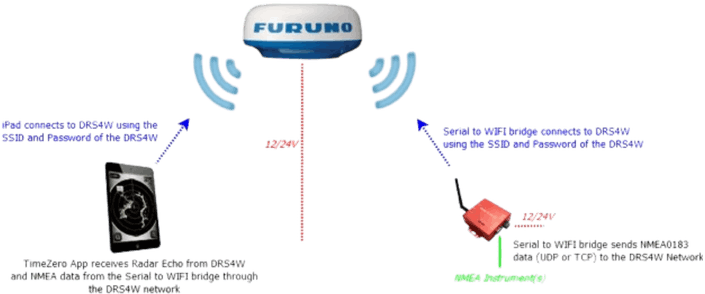
If the Wi-Fi Gateway is set to output NMEA0183 sentences over Wi-Fi using the UDP protocol, you only need to enter the UDP port number in TZ iBoat.
If the Wi-Fi Gateway is using the TCP protocol, you need to enter the TCP port number and the IP address of the Wi-Fi Gateway in TZ iBoat.
In this case (when using TCP), the Wi-Fi Gateway must be set to use a fixed IP address on the DRS4W network (172.31.x.x). We recommend setting the IP address of the Wi-Fi Gateway to 172.31.3.100 with a subnet mask of 255.255.0.0.
Most of the Wi-Fi Gateways can join an existing Wi-Fi network, but you should check directly with the manufacturer.
While recommended, an external heading sensor is not mandatory for the overlay of Radar echoes on the chart. TZ iBoat can use its internal (or external) GPS Course Over Ground (COG) to align the Radar on the chart. Note that the radar echo will appear with high transparency if your vessel is moving below 1 kn (to indicate that the heading derived from your course over ground is inaccurate).
TZ iBoat lets you control the following radar settings directly in the app, so you do not need to switch between multiple apps on your device:
- Switch the radar between Transmit and Standby
- Change the radar range
- Adjust the rain filter (Auto or Manual)
Note: the blank sector and radar alignment adjustments will need to be made from the standalone Furuno app.
No, this is not supported by the DRS4W because a background app must “lock on” the DRS4W connection, preventing the other app from receiving the data. However, you can use two separate devices at the same time (for example, your phone and your tablet).
The Furuno FCV600 or FCV800 can either create its own Wi Fi network or be configured to join an existing Wi Fi network on your boat. If the sounder is set to create its own network, simply connect your phone or tablet to the SSID broadcasted by the unit. If it is set to join your onboard network, make sure your mobile device is connected to the same network for TZ iBoat to detect the sounder.
TZ iBoat gives you direct control over the main Fish Finder settings, including range, gain, frequency, and display options. It effectively turns TZ iBoat into a fully functional second station that you can carry anywhere on board.
The best way to reach our support team depends on whether you have already installed TZ iBoat.
If you have TZ iBoat installed:
Please submit your request from within the app:
- Tap the TZ button at the top left
- Tap Help
- Tap Contact Support
This is the most efficient way to reach us because the app automatically includes useful technical information with your request (TZ iBoat version, device model, and support logs). This helps us understand and resolve your issue much faster, and avoids back-and-forth requests for details.
If you do not have TZ iBoat installed yet:
Please email our support team directly at support@mytimezero.com.
If you notice an inaccuracy on a TZ MAPS chart (for example, a missing buoy, an incorrect depth, an outdated marina layout, or any other discrepancy), please report it directly from within TZ iBoat so our cartography team can review and correct it.
To submit a chart feedback report:
- From the navigation screen, tap on the location on the chart where you noticed the issue.
- In the pop-up menu that appears, tap Chart Feedback.
- Enter a short description of the issue and submit.
Submitting from within the app is the most efficient way to report a chart error because the report automatically includes the exact location you tapped, the TZ MAPS version in use, and other technical details that help our support team locate and verify the issue.
What happens after I submit a report?
Chart feedback reports first go to our Technical Support team, which reviews each submission to determine whether the issue is actually a technical one (for example, the chart for that area has not been downloaded yet, or it needs to be updated) rather than a cartographic discrepancy. If the report is a genuine chart discrepancy, it is escalated to our cartographic team for review and integration into a future chart update.
Because chart updates can take time to be reviewed and integrated, our Technical Support team may close the corresponding ticket once the report has been forwarded to the cartographic team, rather than keeping it open indefinitely. This does not mean the report has been dismissed. If and when the cartographic team integrates your feedback into the chart, our Technical Support team will reach out proactively to let you know.
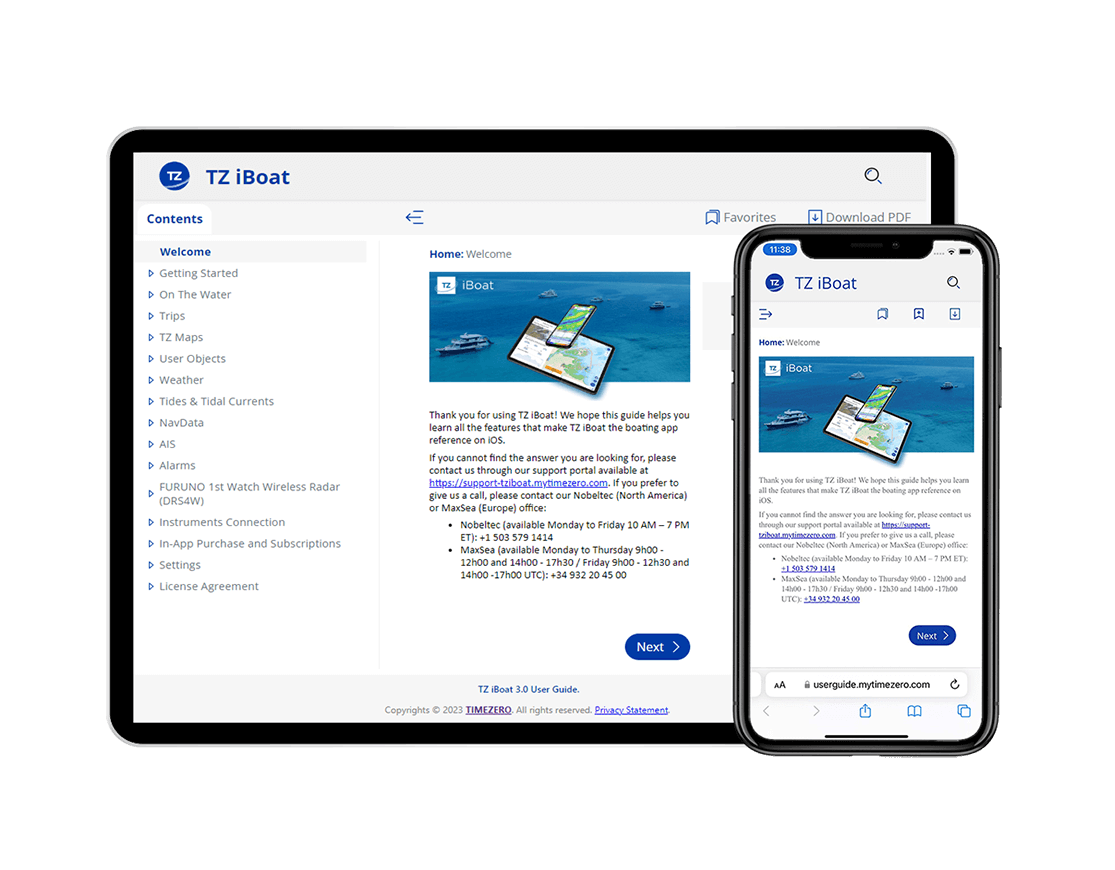
This complete user guide and manual for TZ iBoat contains everything you need to know about our app. Master your boating and get out on the water in as safe and exciting a way as possible.

Download TZ iBoat - Marine Navigation!